Tuesday, 27 February 2018

Swedish Bitcoin Exchange Fybse.se Down Due to Hardware Failure

Yesterday the Swedish bitcoin exchange fybse.se was down due to a hardware failure. The follow message was displayed on the web site.


As always when a bitcoin exchange is down, users fear that it has been hacked, but not in this case. This morning fybse.se is up and running again:


Tuesday, 17 January 2017

Tekniskt fel, Felkod: 500 på Skatteverkets MOSS-tjänst

Skatteverkets Mini One Stop Shop (MOSS) tjänst och jag går visst inte bra ihop. Får felmeddelandet

"Tekniskt fel. Felkod: 500" oavsett vilket text-innehåll jag laddar upp till tjänsten.


Någon som har samma problem och löst det?

Jag har tagit kontakt med supporten på skatteverket och hoppas att dom kan förklara vad problemet är. Här är förresten test-filen jag laddar upp:

MOSS_001;
SE**********01;4;2016;
SE;DK;25,00;50000,00;12500,00;

Har gömt mitt personnummer med *.

Thursday, 18 July 2013

the-officialsurvey.com PopUp Removal

the-officialsurvey.com pop-up in the chrome web browserAre you getting pop-ups from a site called the-officialsurvey.com? So did I when I tested the adware software called WebCake.

the-officialsurvey.com tries to create the impression that a web site owner is running a survey as you can see in the screenshot to the right.

Since I'm the owner of freefixer.com this is in no way an official survey. If you go through with the survey, which I don't recommend,  they state that you will get a 500 SEK value gift. One of the gifts is an IKEA gift certificate, but surprise, they are temporarily out of stock. The other free gift that they do have in stock turns out to be free as in having to pay 35 SEK.

Anyway, in my case the-officialsurvey.com pop-ups started to appear after testing the WebCake adware. Please check out the removal instructions for WebCake.

Did removing WebCake stop the the-officialsurvey.com pop-ups? Please post a comment below to let me know.

Wednesday, 17 July 2013

WebCake Ads Removal Instructions

WebCake ads and popup coupons in the Chrome browser
WebCake is a browser extension that shows ads in Internet Explorer, Safari and Firefox. In the screenshot to the right you see it showing a banner ad at the bottom of the page and a floating coupon ad to the right when browsing amazon.com.

WebCake appears as a Chrome extension. You can also remove WebCake from this tab.If you see ads labeled "Webcake Ads" while browsing the Internet you have the WebCake software installed on your computer. You can also see it in Firefox's Add-ons tab and Chromes Extension tab as the two screenshots to the right shows.

WebCake appears as a Firefox Add-on. WebCake can be removed manually from the add-on tab.You may also see files such as webcake.exe, WebCakeIEClient.dll, OptChrome.exe,  WebCakesetup.exe, WebCakeDesktop.exe and webcakedesktop.updater.exe running on your system or on the hard-drive.

How To Uninstall the WebCake Ads

WebCake can be uninstalled from the Add/Remove programs menu.Luckily it's easy to uninstall WebCake. On Windows, just open the Windows Start Menu -> Control Panel -> Add/Remove (or Programs & Features in Vista/Windows 7/Windows 8) and select Remove or Uninstall for WebCake. Done.


Please give me some feedback

Did this blog provide the information you were looking for? Please let me know so I can improve the blog post with any missing information.


Monday, 8 July 2013

How to view the current queries running in a MYSQL database

The SHOW PROCESSLIST mysql command will show the live queries in your database. This can be quite useful if you are troubleshooting a slow web application or if you are getting the "too many connections" error message and suspect that it is caused some inefficient query to the database.

The output from SHOW PROCESSLIST looks something like this:


| Id | User | Host | db | Command | Time | State | Info                                                                             | 43930645 | username | host:44495 | dbname | Query | 1906 | Locked | DELETE FROM Cache WHERE id LIKE '/file/%-34333/' |
| 43933139 | username | host:50412 | dbname | Query | 3041 | updating | DELETE FROM Cache WHERE id LIKE '/file/%-72655/' |

In most database applications that I've built queries finishes within a second. And in this case there are two queries that have been running for 1906 and 3041 seconds, which clearly indicates that something is wrong.

In my particular case the WHERE LIKE queries had to touch a large number of rows even though the id column was indexed. This happened because the majority of items in the Cache table began with "/file/". I reduced the number of rows the database had to take into account by storing the ids in reverse order and reversing the LIKE query.

Sunday, 5 August 2012

Diablo Auction House Error 31073

I've currently getting error code 31073 when creating any auction on the Diablo 3 gold and real money auction house on the EU servers. I've submitted a support ticket to Blizzard:
Hello Blizzard,
I'm getting error code 31073 when creating auctions on EU gold and EU real money auction houses. Is there anything I can do to avoid this error when creating auctions?
Thanks
/Roger
I'll keep you posted when the customer support reply to the ticket.

Tuesday, 31 July 2012

Diablo launcher stuck initializing on the Mac

Does your Diablo Launcher hang at "Initializing" on your Mac after downloading the critical launcher update this morning?

This is a work-around which will help you play the game until Blizzard comes up with a real fix.

1. Start the Diablo launcher.
2. When it asks you for your Mac admin password to make some system changes, click Cancel instead of OK.
3. The launcher continues without hanging on"Initializing" and the Play button is enable.
4. Press Play. Did that solve the problem?

Sunday, 24 June 2012

Scrolls - Game play capture

Game play capture from Scrolls - the upcoming game from Mojang. In this movie capture I play a match against the medium level AI. The capture is from a pre-alpha build.

Hope you will enjoy this game as much as I do.

Saturday, 16 June 2012

Scrolls - A first look at Mojang's next game


I'm currently playing the pre-alpha of Scrolls, which is Mojang's upcoming card game. I'm figuring out how to best play the game by doing quick matches against the AI. The Easy and Medium difficult level was no problem to beat, but Jon Kågström's Hard level AI wipes the floor with me. Good job Jon!

Want to test the Alpha? Sign up here.

Update: 2012-06-17: Posted more screenshots upon request.

Screenshots

The scrolls configuration startup screen


The login screen


Choose single- or multi-player matches.


The Deck Builder


The tutorial

Gameplay against medium level AI

Gameplay: AI Great Wolf attacking


Me getting my ass kicked at hard level

Saturday, 26 May 2012

How to avoid loud fans when playing World of Warcraft on the 2011 MacBook Pro 13"

Some time ago I retired my old Dell XPS laptop for a 2011 MacBook Pro 13" with a solid state drive. I don't have much time for gaming these days, but from time to time I would like to cast some holy paladin heals in the Warsong Gulch battleground in World of Warcraft.

I was worried that WOW would be to tough for the Intel HD Graphics 3000 card, but to my surprise it ran in 60 fps when running around in Goldshire:


There was a problem though, when running up to Stormwind to search for some new gear and enchants at the auction house there was a major increase in the fan speed. The auction house area is quite crowded on the Silvermoon server. The previously silent Mac was not so silent anymore :(

After some searches I found the follow work-around: The console in WOW allows you to limit the frame rate of the game with the maxfps console command. I created two macros, one that sets the frame rate to 5 which I use when I'm in the crowded Stormwind area, and another macro which limits the frame rate to 30 which I use inside the battlegrounds. Here's a screenshot of how I set up the 5 fps macro:


With these two macros I can play the battlegrounds with a reasonable frame rate and visit the city centers without having the Mac noticeable increasing its fan speed.

Did this solve the loud fan problem when you play World of Warcraft on your Mac?

Thursday, 26 April 2012

Loading seems to be taking a while

I've been getting the "Loading seems to be taking a while" error message when clicking on the @Connect tab on Twitter for about a month now. Pretty annoying. Anyone found a solutions for this?

Loading seems to be taking a while

Wednesday, 5 October 2011

Windows 8, VMWare, HAL_INITIALIZATION_FAILED, VirtualBox and broken network bridging


A couple of days ago I downloaded Windows 8 to port my C++ code to this new platform. I tried to install
Windows 8 into my good old VMWare Workstation 5.5.9 where I run my other virtual machines, but ended up getting a HAL_INITIALIZATION_FAILED error message when booting from the .iso:

Your PC ran into a problem it couldn't handle, and now it needs to restart. HAL_INITIALIZATION_FAILED


But since word was on the street that VirtualBox 4.1.2 could handle Windows 8 I gave that a try.
Unfortunately the Windows installer kept hanging while "Expanding Windows Files" while installing it onto
the VirtualBox virtual machine.

Expanding Windows Files

After some trial and error I changed the number of processors/cores in the VirtualBox virtual machine settings to the same number of processors/cores as on the host system, in my case two. This change seemed to do the trick and the installation completed without any other issues.

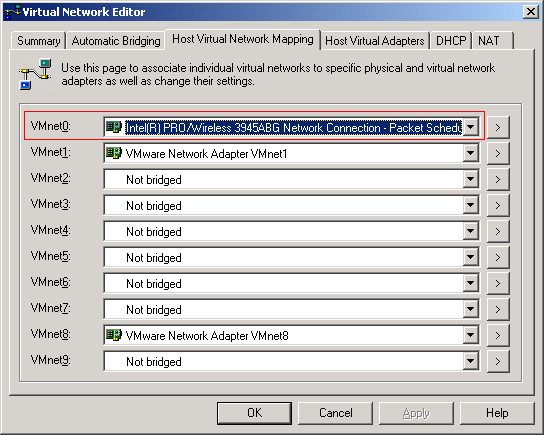
When I went back to run my VMWare virtual machines I noticed that their brigded networking was no longer working :( Switching to NAT and it worked fine, back to bridged and no network connection. For some reason the installation of VirtualBox caused my existing bridged connection to fail. Anyway, the solution was to explicitly set the network adapter VMWare should bridge with, in my case the Wireless adapter:


Hope this helped someone. Now I'm going to try the 64-bit version of Windows 8.

Sunday, 18 September 2011

How to find the process that is using a TCP port

Earlier today I was inspecting all computers in my home for malware with the help of GMER and FreeFixer. I was also using the netstat command line tool to look for any suspicious network connections. Netstat shows established TCP connections and ports that are listening for incoming connections. There was one entry in the netstats output that looked a bit suspicious: A connection to a server at cust.tele2.se on port 5938 and cust.bredbandsbolaget.se, also on port 5938.


The problem with netstat is that I couldn't see the name of the executable file that had established this connection. As usual Sysinternals comes to the rescue. They offer a tool called TCPView which also shows the process name along with connection info. It turned out that TeamViewer that I recently installed had established the cust.tele2.se:5938 connection:


Another alternative to find the process name that owns a connection is to use netstat -o which will list the process identifier for each connection and compare it to the information listed in the Windows Task Manager.

Sunday, 12 September 2010

BUGCODE_USB_DRIVER

Seems like VMWare 5.5, iTunes and my new iPhone don't not mix. When I plugin in the iPhone I get the following blue screen:


The only work-around I could find to this problem was to install iTunes directly on the host machine :(

Friday, 30 April 2010

Desktop Security 2010 Scareware

Stumbled upon another rogue security application called Desktop Security 2010. It has been around for some time now. What's new about this one is that it adds a new column to the Windows Task Manager falsely claiming that some of my files are infect:

Wednesday, 7 April 2010

Your Protection Scareware

Stumbled upon a new scareware application called "Your Protection" today:


FreeFixer v0.55 log
http://www.freefixer.com/
Operating system: Windows XP Service Pack 2
Log dated 2010-04-07 14:20

Registry Startups (5 whitelisted)

HKCU\..\Run, Your Protection = "C:\Program Files\Your Protection\urpprot.exe" -noscan

Friday, 5 February 2010

SafePcAv Scareware

Ran into another scareware application today. It detects malware on a clean machine:


FreeFixer v0.53 log
http://www.freefixer.com/
Operating system: Windows XP Service Pack 2
Log dated 2010-02-05 16:13

Processes (21 whitelisted)
C:\Program Files\FreeFixer\freefixer.exe
C:\Program Files\SafePcAv Software\SafePcAv\SafePcAv.exe

End of FreeFixer log


Sunday, 31 January 2010

"Antimalware Defender" Scareware Disguised as a Windows Critical Security Update

Antimalware Defender is another scareware application. It pops up dialog boxes falsely claiming it is part of a Windows Critical Update:


Antimalware Defender reports lots of malware on a clean system:


You can use FreeFixer to remove AntiMalware Defender. I've pasted a FreeFixer log below which will help you identify the malware items:

FreeFixer v0.53 log
http://www.freefixer.com/
Operating system: Windows XP Service Pack 2
Log dated 2010-01-31 15:04


Browser Helper Objects

{fa217b17-bd53-4441-bc32-3de578a2826a}, {fa217b17-bd53-4441-bc32-3de578a2826a}, C:\WINDOWS\system32\fa217b17-bd53-4445-bc32-3de578a2826a_6.avi

Registry Startups (4 whitelisted)

HKLM\..\Run, fa217b17-bd53-4445-bc32-3de578a2826a_6 = "C:\WINDOWS\system32\rundll32.exe" "C:\WINDOWS\system32\fa217b17-bd53-4445-bc32-3de578a2826a_6.avi", start minimized

HKCU\..\Run, fa217b17-bd53-4445-bc32-3de578a2826a_6 = "C:\WINDOWS\system32\rundll32.exe" "C:\Documents and Settings\roger\Application Data\fa217b17-bd53-4445-bc32-3de578a2826a_6.avi", start minimized

Processes (23 whitelisted)

C:\Program Files\FreeFixer\freefixer.exe

Explorer.exe Modules (109 whitelisted)

C:\WINDOWS\system32\MSVCR71.dll

Rundll Modules (71 whitelisted)

C:\DOCUME~1\roger\LOCALS~1\Temp\wrk90.tmp

Recently created/modified files

2 minutes, c:\Documents and Settings\roger\Local Settings\Temp\wrk90.tmp

2 minutes, c:\Program Files\Antimalware Defender\Antimalware Defender.dll

2 minutes, c:\Documents and Settings\roger\Local Settings\Application Data\fa217b17-bd53-4445-bc32-3de578a2826a_6.avi

2 minutes, c:\Documents and Settings\roger\Application Data\fa217b17-bd53-4445-bc32-3de578a2826a_6.avi

2 minutes, c:\Documents and Settings\All Users\Application Data\fa217b17-bd53-4445-bc32-3de578a2826a_6.avi

2 minutes, c:\WINDOWS\system32\fa217b17-bd53-4445-bc32-3de578a2826a_6.avi

2 minutes, c:\Documents and Settings\roger\Local Settings\Temporary Internet Files\Content.IE5\6CSRVCZ7\s[2].bin


Did this help you remove AntiMalware Defender?

Saturday, 30 January 2010

MyPcSecure Scareware

MyPcSecure claims to detect malware on a clean system:


It's located in C:\Program Files\MyPcSecure Software\MyPcSecure\MyPcSecure.exe

Wednesday, 27 January 2010

How to set up Magic Mouse on Windows


Do you want to use Apple's Magic Mouse on Windows? No problem, just follow these step-by-step instructions. I've tested this on Windows XP. Right-click, left-click and vertical scroll are working just fine:

1. Open up the Windows Control Panel. (classic mode):

2. Double click on Bluetooth Devices:


3. In the Devices tab, click Add.


4. Check "My device is set up and ready to be found".

5. Power on your magic mouse with the on/off switch under the mouse. If it is already powered on, power it off and on again.

6. Click Next.

7. After a while, Windows will find the Magic Mouse.

8. Select "Apple Wireless Mouse" and click Next


9. Select "Use the passkey found in the documentation". Type in 0000 as the passkey and click Next:


10 Click Finish:


11. Click OK:


12. Now you should be able to move the mouse pointer, use left- and right-click. To get the vertical scroll working you need to install the Magic Mouse Windows drivers. These are made available by the great people over at uneasysilence.com. There's a 32-bit and and 64-bit version.

13. Done.

Did this help you get your Magic Mouse working on Windows?