
Showing posts with label rogue anti-spyware. Show all posts
Showing posts with label rogue anti-spyware. Show all posts
Friday, 30 April 2010
Desktop Security 2010 Scareware
Stumbled upon another rogue security application called Desktop Security 2010. It has been around for some time now. What's new about this one is that it adds a new column to the Windows Task Manager falsely claiming that some of my files are infect:


Wednesday, 7 April 2010
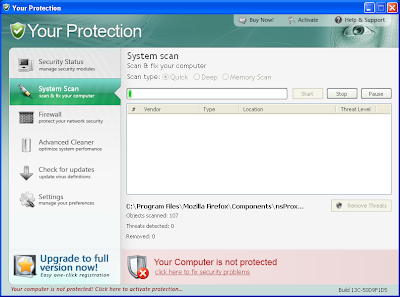
Your Protection Scareware
Stumbled upon a new scareware application called "Your Protection" today:

FreeFixer v0.55 log
http://www.freefixer.com/
Operating system: Windows XP Service Pack 2
Log dated 2010-04-07 14:20
Registry Startups (5 whitelisted)
HKCU\..\Run, Your Protection = "C:\Program Files\Your Protection\urpprot.exe" -noscan
Friday, 5 February 2010
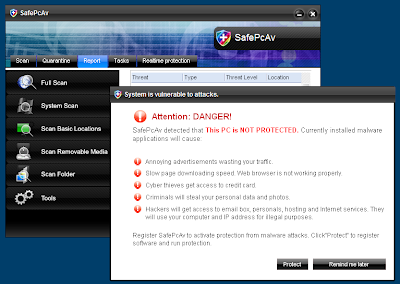
SafePcAv Scareware
Ran into another scareware application today. It detects malware on a clean machine:

FreeFixer v0.53 log
http://www.freefixer.com/
Operating system: Windows XP Service Pack 2
Log dated 2010-02-05 16:13
Processes (21 whitelisted)
C:\Program Files\FreeFixer\freefixer.exe
C:\Program Files\SafePcAv Software\SafePcAv\SafePcAv.exe
End of FreeFixer log
Sunday, 31 January 2010
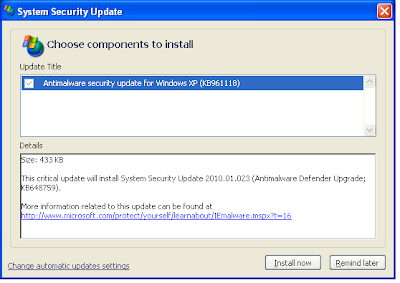
"Antimalware Defender" Scareware Disguised as a Windows Critical Security Update
Antimalware Defender is another scareware application. It pops up dialog boxes falsely claiming it is part of a Windows Critical Update:
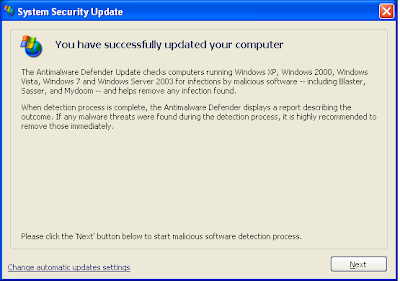
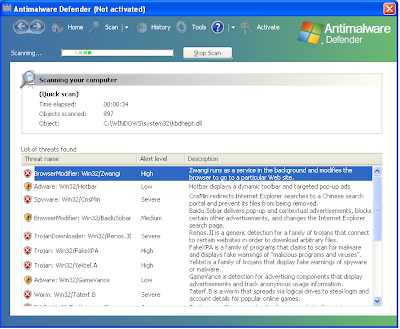
Antimalware Defender reports lots of malware on a clean system:
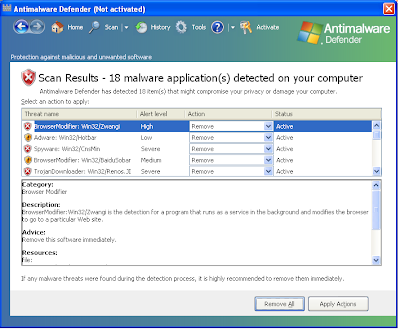
You can use FreeFixer to remove AntiMalware Defender. I've pasted a FreeFixer log below which will help you identify the malware items:
Did this help you remove AntiMalware Defender?


Antimalware Defender reports lots of malware on a clean system:

You can use FreeFixer to remove AntiMalware Defender. I've pasted a FreeFixer log below which will help you identify the malware items:
FreeFixer v0.53 log
http://www.freefixer.com/
Operating system: Windows XP Service Pack 2
Log dated 2010-01-31 15:04
Browser Helper Objects
{fa217b17-bd53-4441-bc32-3de578a2826a}, {fa217b17-bd53-4441-bc32-3de578a2826a}, C:\WINDOWS\system32\fa217b17-bd53-4445-bc32-3de578a2826a_6.avi
Registry Startups (4 whitelisted)
HKLM\..\Run, fa217b17-bd53-4445-bc32-3de578a2826a_6 = "C:\WINDOWS\system32\rundll32.exe" "C:\WINDOWS\system32\fa217b17-bd53-4445-bc32-3de578a2826a_6.avi", start minimized
HKCU\..\Run, fa217b17-bd53-4445-bc32-3de578a2826a_6 = "C:\WINDOWS\system32\rundll32.exe" "C:\Documents and Settings\roger\Application Data\fa217b17-bd53-4445-bc32-3de578a2826a_6.avi", start minimized
Processes (23 whitelisted)
C:\Program Files\FreeFixer\freefixer.exe
Explorer.exe Modules (109 whitelisted)
C:\WINDOWS\system32\MSVCR71.dll
Rundll Modules (71 whitelisted)
C:\DOCUME~1\roger\LOCALS~1\Temp\wrk90.tmp
Recently created/modified files
2 minutes, c:\Documents and Settings\roger\Local Settings\Temp\wrk90.tmp
2 minutes, c:\Program Files\Antimalware Defender\Antimalware Defender.dll
2 minutes, c:\Documents and Settings\roger\Local Settings\Application Data\fa217b17-bd53-4445-bc32-3de578a2826a_6.avi
2 minutes, c:\Documents and Settings\roger\Application Data\fa217b17-bd53-4445-bc32-3de578a2826a_6.avi
2 minutes, c:\Documents and Settings\All Users\Application Data\fa217b17-bd53-4445-bc32-3de578a2826a_6.avi
2 minutes, c:\WINDOWS\system32\fa217b17-bd53-4445-bc32-3de578a2826a_6.avi
2 minutes, c:\Documents and Settings\roger\Local Settings\Temporary Internet Files\Content.IE5\6CSRVCZ7\s[2].bin
Did this help you remove AntiMalware Defender?
Saturday, 30 January 2010
MyPcSecure Scareware
MyPcSecure claims to detect malware on a clean system:
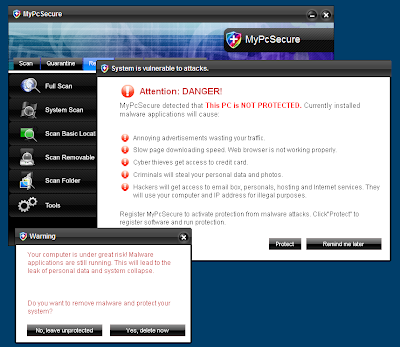
It's located in C:\Program Files\MyPcSecure Software\MyPcSecure\MyPcSecure.exe

It's located in C:\Program Files\MyPcSecure Software\MyPcSecure\MyPcSecure.exe
Tuesday, 12 January 2010
SysDefenders Scareware
Here's another faked anti-virus program. Claims to detects lots of malware on a clean system:
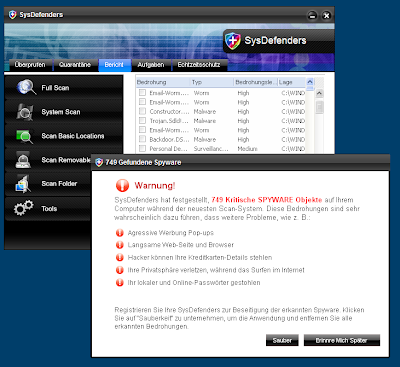

FreeFixer v0.51 log
http://www.freefixer.com/
Operating system: Windows XP Service Pack 2
Log dated 2010-01-12 07:29
Registry Startups (4 whitelisted)
HKCU\..\Run, 8ytzu5al.exe = C:\WINDOWS\system32\8ytzu5al.exe
Processes (21 whitelisted)
C:\Program Files\FreeFixer.0.51\freefixer.exe
C:\DOCUME~1\roger\LOCALS~1\Temp\8ytzu5al.exe
C:\Program Files\SysDefenders Software\SysDefenders\SysDefenders.exe
End of FreeFixer log
Friday, 1 January 2010
Antivirus PC 2009
Antivirus PC 2009 is yet another faked antivirus program. It claims to detect malware on a clean system:


Wednesday, 9 December 2009
Internet Security 2010
Ran into another faked anti-virus program:

FreeFixer log below. I've highlighted the bad items in red. Hope this helps you with the removal.
FreeFixer v0.50 log
http://www.freefixer.com/
Operating system: Windows XP Service Pack 2
Log dated 2009-12-10 02:49
Registry Startups (3 whitelisted)
HKCU\..\Run, Internet Security 2010 = C:\Program Files\InternetSecurity2010\IS2010.exe
Processes (19 whitelisted)
C:\Program Files\FreeFixer\freefixer.exe
C:\Program Files\InternetSecurity2010\IS2010.exe
Recently created/modified files
0 minutes, c:\Program Files\InternetSecurity2010\IS2010.exe
0 minutes, c:\Documents and Settings\roger\Local Settings\Temporary Internet Files\Content.IE5\O1EF052R\SetupIS2010[1].exe

FreeFixer log below. I've highlighted the bad items in red. Hope this helps you with the removal.
FreeFixer v0.50 log
http://www.freefixer.com/
Operating system: Windows XP Service Pack 2
Log dated 2009-12-10 02:49
Registry Startups (3 whitelisted)
HKCU\..\Run, Internet Security 2010 = C:\Program Files\InternetSecurity2010\IS2010.exe
Processes (19 whitelisted)
C:\Program Files\FreeFixer\freefixer.exe
C:\Program Files\InternetSecurity2010\IS2010.exe
Recently created/modified files
0 minutes, c:\Program Files\InternetSecurity2010\IS2010.exe
0 minutes, c:\Documents and Settings\roger\Local Settings\Temporary Internet Files\Content.IE5\O1EF052R\SetupIS2010[1].exe
Friday, 13 November 2009
Control Center Rogue
Yet another rogue. This one is promoted as a free video. If you install the "video", you will get the Control Center Rogue. It claims to detect lots of viruses on a clean system. It also replaces the default shell with cc.exe.
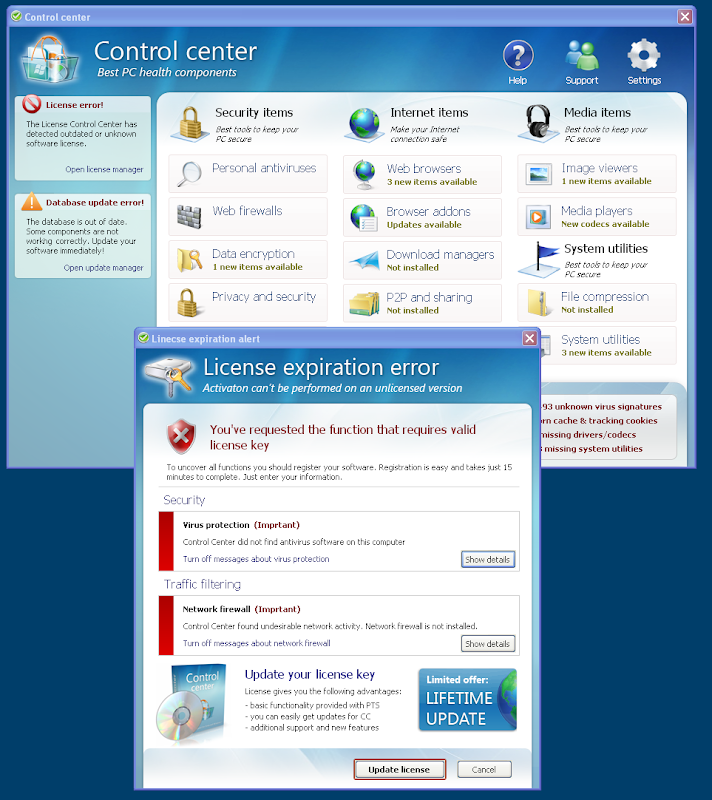
If you got this infection and want to start your default shell (explorer.exe) again, just press Ctrl + shift + ESC and the Task Manager will pop up. Open the File menu and select New Task. Type in explorer.exe and press enter. Now you can start FreeFixer to remove the ControlCenter malware. I've marked the malware files in red in the FreeFixer log below:
FreeFixer v0.49 log
http://www.freefixer.com/
Operating system: Windows XP Service Pack 2
Log dated 2009-11-14 00:30
Shell settings
HKCU\..\Winlogon, Shell = C:\Documents and Settings\roger\Application Data\CC\cc.exe
Registry Startups (3 whitelisted)
HKCU\..\Run, agent.exe = C:\Documents and Settings\roger\Application Data\CC\agent.exe
Processes (18 whitelisted)
C:\Program Files\FreeFixer\freefixer.exe
C:\Documents and Settings\roger\Application Data\CC\agent.exe
C:\Documents and Settings\roger\Application Data\CC\cc.exe
End of FreeFixer log

If you got this infection and want to start your default shell (explorer.exe) again, just press Ctrl + shift + ESC and the Task Manager will pop up. Open the File menu and select New Task. Type in explorer.exe and press enter. Now you can start FreeFixer to remove the ControlCenter malware. I've marked the malware files in red in the FreeFixer log below:
FreeFixer v0.49 log
http://www.freefixer.com/
Operating system: Windows XP Service Pack 2
Log dated 2009-11-14 00:30
Shell settings
HKCU\..\Winlogon, Shell = C:\Documents and Settings\roger\Application Data\CC\cc.exe
Registry Startups (3 whitelisted)
HKCU\..\Run, agent.exe = C:\Documents and Settings\roger\Application Data\CC\agent.exe
Processes (18 whitelisted)
C:\Program Files\FreeFixer\freefixer.exe
C:\Documents and Settings\roger\Application Data\CC\agent.exe
C:\Documents and Settings\roger\Application Data\CC\cc.exe
End of FreeFixer log
Thursday, 12 November 2009
AntiAID
Another day, another faked anti-virus program. Today it's called AntiAID and claims to detect a bunch of malware on a clean computer:

I've pasted a FreeFixer log below and highlighted the malware files in red:

I've pasted a FreeFixer log below and highlighted the malware files in red:
FreeFixer v0.49 log
http://www.freefixer.com/
Operating system: Windows XP Service Pack 2
Log dated 2009-11-12 10:22
Registry Startups (3 whitelisted)
HKCU\..\Run, 8enyqcv1.exe = C:\WINDOWS\system32\8enyqcv1.exe
HKCU\..\Run, AntiAID = C:\Program Files\AntiAID Software\AntiAID\AntiAID.exe -min
Processes (20 whitelisted)
C:\Program Files\FreeFixer\freefixer.exe
C:\DOCUME~1\roger\LOCALS~1\Temp\8enyqcv1.exe
C:\Program Files\AntiAID Software\AntiAID\AntiAID.exe
Recently created/modified files (29 whitelisted)
-123 minutes, c:\Program Files\AntiAID Software\AntiAID\AntiAID.exe
End of FreeFixer log
Wednesday, 11 November 2009
SystemWarrior Malware
Ran into a new faked anti-virus program today called System Warrior. It claims to have found lots of malware on a clean system:

I've pasted the FreeFixer log from the infected system below, and marked the malware items in red. Hopefully this will help you to remove SystemWarrior:
FreeFixer v0.49 log
http://www.freefixer.com/
Operating system: Windows XP Service Pack 2
Log dated 2009-11-11 14:51
Registry Startups (3 whitelisted)
HKLM\..\Run, SystemWarrior = "C:\Program Files\SystemWarrior Software\SystemWarrior\SystemWarrior.exe" -min
HKCU\..\Run, zrn6.tmp.exe = C:\WINDOWS\system32\zrn6.tmp.exe
Processes (21 whitelisted)
C:\Program Files\FreeFixer\freefixer.exe
C:\DOCUME~1\roger\LOCALS~1\Temp\zrn6.tmp.exe
C:\Program Files\SystemWarrior Software\SystemWarrior\SystemWarrior.exe
Recently created/modified files (16 whitelisted)
0 minutes, c:\Program Files\SystemWarrior Software\SystemWarrior\Uninstall.exe
0 minutes, c:\Program Files\SystemWarrior Software\SystemWarrior\SystemWarrior.exe
0 minutes, c:\WINDOWS\system32\zrn6.tmp.exe
0 minutes, c:\Documents and Settings\roger\Local Settings\Temp\zrn6.tmp.exe
0 minutes, c:\Documents and Settings\roger\Local Settings\Temp\tbg5.tmp.exe
End of FreeFixer log

I've pasted the FreeFixer log from the infected system below, and marked the malware items in red. Hopefully this will help you to remove SystemWarrior:
FreeFixer v0.49 log
http://www.freefixer.com/
Operating system: Windows XP Service Pack 2
Log dated 2009-11-11 14:51
Registry Startups (3 whitelisted)
HKLM\..\Run, SystemWarrior = "C:\Program Files\SystemWarrior Software\SystemWarrior\SystemWarrior.exe" -min
HKCU\..\Run, zrn6.tmp.exe = C:\WINDOWS\system32\zrn6.tmp.exe
Processes (21 whitelisted)
C:\Program Files\FreeFixer\freefixer.exe
C:\DOCUME~1\roger\LOCALS~1\Temp\zrn6.tmp.exe
C:\Program Files\SystemWarrior Software\SystemWarrior\SystemWarrior.exe
Recently created/modified files (16 whitelisted)
0 minutes, c:\Program Files\SystemWarrior Software\SystemWarrior\Uninstall.exe
0 minutes, c:\Program Files\SystemWarrior Software\SystemWarrior\SystemWarrior.exe
0 minutes, c:\WINDOWS\system32\zrn6.tmp.exe
0 minutes, c:\Documents and Settings\roger\Local Settings\Temp\zrn6.tmp.exe
0 minutes, c:\Documents and Settings\roger\Local Settings\Temp\tbg5.tmp.exe
End of FreeFixer log
Monday, 9 November 2009
AntiMalware Rogue
Found another rogue today named "AntiMalware". It claims to have found 10 threats on a clean computer:

This rogue is located in C:\Program Files\AntiMalware\. Its executable file is named antimalware.exe.

This rogue is located in C:\Program Files\AntiMalware\. Its executable file is named antimalware.exe.
Monday, 2 November 2009
BlockScanner Rogue
Ran into a new rogue today called BlockScanner:

Here's a FreeFixer log which shows what modifications the Block Scanner software did on the infected computer:
FreeFixer v0.48 log
http://www.freefixer.com/
Operating system: Windows XP Service Pack 2
Log dated 2009-11-02 13:03
Registry Startups (3 whitelisted)
HKLM\..\Run, 0079dcbc.exe = C:\WINDOWS\system32\0079dcbc.exe
HKCU\..\Run, goz21.tmp.exe = C:\WINDOWS\system32\goz21.tmp.exe
HKCU\..\Run, BlockScanner = C:\Program Files\BlockScanner Software\BlockScanner\BlockScanner.exe -min
Processes (20 whitelisted)
C:\Program Files\FreeFixer\freefixer.exe
C:\DOCUME~1\roger\LOCALS~1\Temp\goz21.tmp.exe
C:\DOCUME~1\roger\LOCALS~1\Temp\nqn22.tmp.exe
C:\Program Files\BlockScanner Software\BlockScanner\BlockScanner.exe
Recently created/modified files (1 whitelisted)
3 minutes, c:\Program Files\BlockScanner Software\BlockScanner\uninstall.exe
3 minutes, c:\Documents and Settings\roger\Local Settings\Temp\nsu20.tmp\nsProcess.dll
3 minutes, c:\WINDOWS\system32\goz21.tmp.exe
3 minutes, c:\WINDOWS\system32\0079dcbc.exe
3 minutes, c:\Documents and Settings\roger\Local Settings\Temp\nqn22.tmp.exe
3 minutes, c:\Documents and Settings\roger\Local Settings\Temp\goz21.tmp.exe
3 minutes, c:\Documents and Settings\roger\Local Settings\Temp\rew1E.tmp.exe
..

Here's a FreeFixer log which shows what modifications the Block Scanner software did on the infected computer:
FreeFixer v0.48 log
http://www.freefixer.com/
Operating system: Windows XP Service Pack 2
Log dated 2009-11-02 13:03
Registry Startups (3 whitelisted)
HKLM\..\Run, 0079dcbc.exe = C:\WINDOWS\system32\0079dcbc.exe
HKCU\..\Run, goz21.tmp.exe = C:\WINDOWS\system32\goz21.tmp.exe
HKCU\..\Run, BlockScanner = C:\Program Files\BlockScanner Software\BlockScanner\BlockScanner.exe -min
Processes (20 whitelisted)
C:\Program Files\FreeFixer\freefixer.exe
C:\DOCUME~1\roger\LOCALS~1\Temp\goz21.tmp.exe
C:\DOCUME~1\roger\LOCALS~1\Temp\nqn22.tmp.exe
C:\Program Files\BlockScanner Software\BlockScanner\BlockScanner.exe
Recently created/modified files (1 whitelisted)
3 minutes, c:\Program Files\BlockScanner Software\BlockScanner\uninstall.exe
3 minutes, c:\Documents and Settings\roger\Local Settings\Temp\nsu20.tmp\nsProcess.dll
3 minutes, c:\WINDOWS\system32\goz21.tmp.exe
3 minutes, c:\WINDOWS\system32\0079dcbc.exe
3 minutes, c:\Documents and Settings\roger\Local Settings\Temp\nqn22.tmp.exe
3 minutes, c:\Documents and Settings\roger\Local Settings\Temp\goz21.tmp.exe
3 minutes, c:\Documents and Settings\roger\Local Settings\Temp\rew1E.tmp.exe
..
Wednesday, 28 October 2009
Windows Police Pro
Another day, another rogue. This one is called Windows Police Pro:

Here's a FreeFixer log from the infected computer. Malware files appear in red:

Here's a FreeFixer log from the infected computer. Malware files appear in red:
FreeFixer v0.48 log
http://www.freefixer.com/
Operating system: Windows XP Service Pack 2
Log dated 2009-10-27 18:28
Registry Startups (3 whitelisted)
HKCU\..\Run, inixs = C:\WINDOWS\system32\minix32.exe
Processes (18 whitelisted)
C:\WINDOWS\system32\minix32.exe
C:\Program Files\FreeFixer\freefixer.exe
Recently created/modified files (18 whitelisted)
2 minutes, c:\WINDOWS\system32\pump.exe
3 minutes, c:\WINDOWS\svchast.exe
3 minutes, c:\WINDOWS\system32\plugie.dll
3 minutes, c:\Program Files\Windows Police Pro\Windows Police Pro.exe
3 minutes, c:\Program Files\Windows Police Pro\msvcr80.dll
3 minutes, c:\Program Files\Windows Police Pro\msvcp80.dll
3 minutes, c:\Program Files\Windows Police Pro\msvcm80.dll
Tuesday, 27 October 2009
Active Security rogue
Another rogue, dubbed Active Security:

Here's a FreeFixer log of the infected system. Malware files appear in red:


Here's a FreeFixer log of the infected system. Malware files appear in red:
FreeFixer v0.48 log
http://www.freefixer.com/
Operating system: Windows XP Service Pack 2
Log dated 2009-10-27 17:57
Registry Startups (3 whitelisted)
HKCU\..\Run, wow64main.exe = C:\DOCUME~1\roger\LOCALS~1\Temp\wow64main.exe
HKCU\..\Run, Active Security = "C:\Program Files\Active Security\asecurity.exe" -noscan
Processes (23 whitelisted)
C:\Program Files\FreeFixer\freefixer.exe
C:\DOCUME~1\roger\LOCALS~1\Temp\wow64main.exe
C:\DOCUME~1\roger\LOCALS~1\Temp\wscsvc32.exe
C:\Program Files\Active Security\asecurity.exe
..
Friday, 23 October 2009
SecurityTool Rogue
Ran into a new rogue today called "Security Tool":
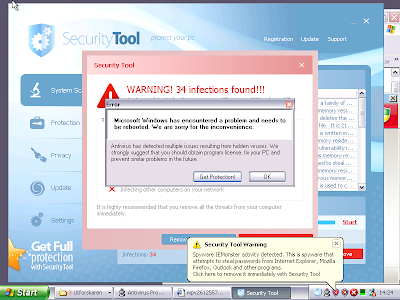
This program was installed by exploiting a security hole in an unpatched Windows XP installation. Below is a FreeFixer log to show what files appeared on the infected computer:

This program was installed by exploiting a security hole in an unpatched Windows XP installation. Below is a FreeFixer log to show what files appeared on the infected computer:
FreeFixer v0.47 log
http://www.freefixer.com/
Operating system: Windows XP Service Pack 1
Log dated 2009-10-23 14:45
Registry Startups
HKLM\..\Run, sysgif32 = C:\WINDOWS\Temp\wpv511255703227.exe
HKLM\..\Run, restorer64_a = C:\WINDOWS\system32\restorer64_a.exe
HKLM\..\Run, 60306520 = C:\DOCUME~1\ALLUSE~1\APPLIC~1\60306520\60306520.exe
HKLM\..\Run, PromoReg = C:\WINDOWS\Temp\_ex-08.exe
HKLM\..\Run, Antivirus Pro 2010 = "C:\Program\AntivirusPro_2010\AntivirusPro_2010.exe" /hide
HKLM\..\Run, Regedit32 = C:\WINDOWS\system32\regedit.exe (file is missing)
HKCU\..\Run, restorer64_a = C:\Documents and Settings\Roger\restorer64_a.exe
HKCU\..\Run, mserv = C:\Documents and Settings\Roger\Application Data\seres.exe
HKCU\..\Run, svchost = C:\Documents and Settings\Roger\Application Data\svcst.exe
Autostart shortcuts
zavupd32.exe, , C:\Documents and Settings\Roger\Start-meny\Program\Autostart\zavupd32.exe
Recently created/modified files
15 minutes, c:\Documents and Settings\Roger\Lokala inställningar\Temp\BN6.tmp
15 minutes, c:\WINDOWS\system32\dllcache\agp440.sys
15 minutes, c:\WINDOWS\system32\drivers\AGP440.SYS
15 minutes, c:\Documents and Settings\Roger\Lokala inställningar\Temp\BN5.tmp
42 minutes, c:\Documents and Settings\Roger\Lokala inställningar\Temp\TMP13.tmp
42 minutes, c:\Documents and Settings\Roger\Lokala inställningar\Temporary Internet Files\Content.IE5\2B6JEHAV\win[1].exe
42 minutes, c:\WINDOWS\system32\_scui.cpl
42 minutes, c:\Program\AntivirusPro_2010\Uninstall.exe
42 minutes, c:\Program\AntivirusPro_2010\wscui.cpl
42 minutes, c:\Program\AntivirusPro_2010\htmlayout.dll
42 minutes, c:\Program\AntivirusPro_2010\pthreadVC2.dll
42 minutes, c:\Program\AntivirusPro_2010\Microsoft.VC80.CRT\msvcr80.dll
42 minutes, c:\Program\AntivirusPro_2010\Microsoft.VC80.CRT\msvcp80.dll
42 minutes, c:\Program\AntivirusPro_2010\Microsoft.VC80.CRT\msvcm80.dll
42 minutes, c:\Program\AntivirusPro_2010\AVEngn.dll
42 minutes, c:\Program\AntivirusPro_2010\AntivirusPro_2010.exe
44 minutes, c:\Documents and Settings\Roger\Application Data\lizkavd.exe
44 minutes, c:\Documents and Settings\Roger\Lokala inställningar\Temporary Internet Files\Content.IE5\G5ER0HM3\Install[1].exe
44 minutes, c:\Documents and Settings\All Users\Application Data\60306520\60306520.exe
44 minutes, c:\Documents and Settings\Roger\Application Data\svcst.exe
44 minutes, c:\WINDOWS\Temp\_ex-08.exe
44 minutes, c:\Documents and Settings\Roger\Application Data\seres.exe
44 minutes, c:\Documents and Settings\Roger\Lokala inställningar\Temp\BN12.tmp
44 minutes, c:\Documents and Settings\Roger\restorer64_a.exe
45 minutes, c:\WINDOWS\system32\restorer64_a.exe
45 minutes, c:\Documents and Settings\Roger\Lokala inställningar\Temp\10.tmp
45 minutes, c:\WINDOWS\Temp\wpv791256209457.exe
45 minutes, c:\WINDOWS\Temp\wpv651256085323.exe
45 minutes, c:\WINDOWS\Temp\wpv511255703227.exe
Wednesday, 21 October 2009
Antivirus Pro 2010 Rogue
Ran into a another rogue today. Antivirus Pro 2010:

These malware files appeared on the computer: AntivirusPro_2010.exe, seres.exe, lizjavd.exe and svcst.exe.

These malware files appeared on the computer: AntivirusPro_2010.exe, seres.exe, lizjavd.exe and svcst.exe.
Friday, 14 August 2009
PC Antispyware 2010 Rogue
Here's another rogue anti-spyware application that was installed by exploiting a security hole:


Thursday, 13 August 2009
Advanced Virus Remover Rogue
Ran into this rogue anti-virus program a few days ago:

Today I ran into this rogue again. I captured a FreeFixer log where you can see the modifications Advanced Virus Remover did on the infected computer:

Update October 27, 2009
Today I ran into this rogue again. I captured a FreeFixer log where you can see the modifications Advanced Virus Remover did on the infected computer:
FreeFixer v0.48 log
http://www.freefixer.com/
Operating system: Windows XP Service Pack 2
Log dated 2009-10-27 18:15
System policies
HKCU\..\policies\system, DisableTaskMgr = 1
Transport service providers (3 whitelisted)
{3F8DAED5-1A15-44C0-A465-27536D3B3C98} - C:\WINDOWS\system32\winhelper.dll
{6DBCA3F0-ACCF-4F0E-8998-F976BB4FA56D} - C:\WINDOWS\system32\winhelper.dll
Registry Startups (3 whitelisted)
HKLM\..\Run, winupdate.exe = C:\WINDOWS\system32\winupdate.exe
HKCU\..\Run, Advanced Virus Remover = C:\Program Files\AdvancedVirusRemover\PAVRM.exe
Processes (19 whitelisted)
C:\Program Files\FreeFixer\freefixer.exe
C:\WINDOWS\system32\winupdate.exe
C:\Program Files\AdvancedVirusRemover\PAVRM.exe
Application modules (70 whitelisted)
C:\WINDOWS\system32\winhelper.dll
Recently created/modified files
1 minute, c:\Program Files\AdvancedVirusRemover\PAVRM.exe
1 minute, c:\Documents and Settings\roger\Local Settings\Temporary Internet Files\Content.IE5\6CSRVCZ7\SetupAdvancedVirusRemover[1].exe
1 minute, c:\WINDOWS\system32\winhelper.dll
1 minute, c:\Documents and Settings\roger\Local Settings\Temporary Internet Files\Content.IE5\4HUF4TYN\dfghfghgfj[1].dll
1 minute, c:\WINDOWS\system32\winupdate.exe
..
Thursday, 9 July 2009
Antivirus Plus
Ran into the good old rogue Antivirus Plus application today:

Today I ran into AntiVirus plus again. I capped a FreeFixer log so you can see what changes this rogue antivirus program did:

Update October 27, 2009
Today I ran into AntiVirus plus again. I capped a FreeFixer log so you can see what changes this rogue antivirus program did:
FreeFixer v0.48 log
http://www.freefixer.com/
Operating system: Windows XP Service Pack 2
Log dated 2009-10-27 18:06
Registry Startups (3 whitelisted)
HKLM\..\Run, AntiVirus Plus = C:\Program Files\AntiVirus Plus\AntiVirus Plus.70155.exe
HKCU\..\Run, AntiVirus Plus = C:\Program Files\AntiVirus Plus\AntiVirus Plus.70155.exe
Autostart shortcuts
AntiVirus Plus.lnk, , C:\Program Files\AntiVirus Plus\AntiVirus Plus.70155.exe
AntiVirus Plus.lnk, , C:\Program Files\AntiVirus Plus\AntiVirus Plus.70155.exe
HOSTS file
78.159.125.60 us.search.yahoo.com
78.159.125.60 uk.search.yahoo.com
78.159.125.60 search.yahoo.com
78.159.125.60 www.google.com.br
78.159.125.60 www.google.it
78.159.125.60 www.google.es
78.159.125.60 www.google.co.jp
78.159.125.60 www.google.com.mx
78.159.125.60 www.google.ca
78.159.125.60 www.google.com.au
78.159.125.60 www.google.nl
78.159.125.60 www.google.co.za
78.159.125.60 www.google.be
78.159.125.60 www.google.gr
78.159.125.60 www.google.at
78.159.125.60 www.google.se
78.159.125.60 www.google.ch
78.159.125.60 www.google.pt
78.159.125.60 www.google.dk
78.159.125.60 www.google.fi
78.159.125.60 www.google.ie
78.159.125.60 www.google.no
78.159.125.60 www.google.com
78.159.125.60 www.google.de
78.159.125.60 www.google.fr
78.159.125.60 www.google.co.uk
Subscribe to:
Posts (Atom)