Showing posts with label vmware. Show all posts
Wednesday, 5 October 2011
Windows 8, VMWare, HAL_INITIALIZATION_FAILED, VirtualBox and broken network bridging
A couple of days ago I downloaded Windows 8 to port my C++ code to this new platform. I tried to install
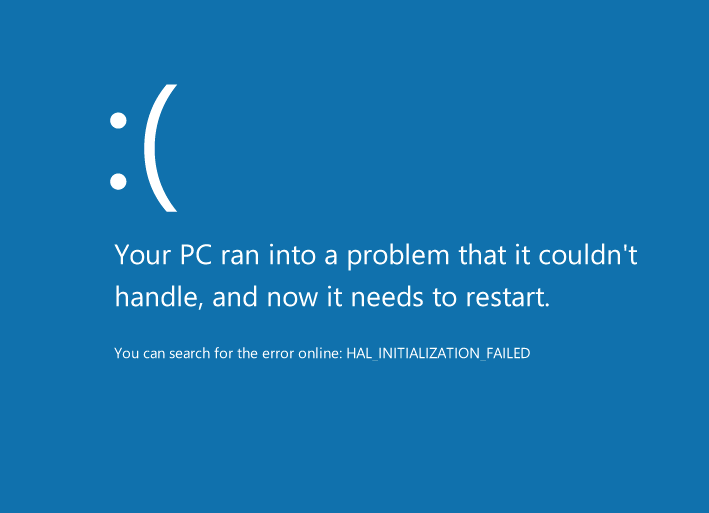
Windows 8 into my good old VMWare Workstation 5.5.9 where I run my other virtual machines, but ended up getting a HAL_INITIALIZATION_FAILED error message when booting from the .iso:
But since word was on the street that VirtualBox 4.1.2 could handle Windows 8 I gave that a try.
Unfortunately the Windows installer kept hanging while "Expanding Windows Files" while installing it onto
the VirtualBox virtual machine.
After some trial and error I changed the number of processors/cores in the VirtualBox virtual machine settings to the same number of processors/cores as on the host system, in my case two. This change seemed to do the trick and the installation completed without any other issues.
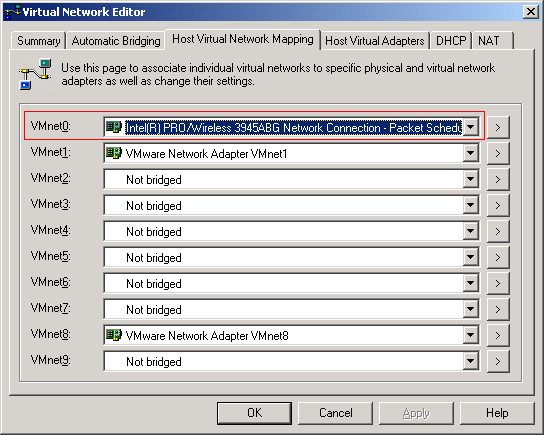
When I went back to run my VMWare virtual machines I noticed that their brigded networking was no longer working :( Switching to NAT and it worked fine, back to bridged and no network connection. For some reason the installation of VirtualBox caused my existing bridged connection to fail. Anyway, the solution was to explicitly set the network adapter VMWare should bridge with, in my case the Wireless adapter:
Hope this helped someone. Now I'm going to try the 64-bit version of Windows 8.
Sunday, 12 September 2010
BUGCODE_USB_DRIVER
Monday, 13 July 2009
Darn, my VMware virtual machine was detected
Thursday, 25 June 2009
Why does Windows create fragmented files by default?
This is wierd. My external drive got lots of free space and is completely defragmented:

Now, I'm backing up my VMware virtual machines, by copying the VMware files to the external drive. These are a bunch of 2GB files which should fit without any problem in the free space of the drive. But for some reason, these files get fragmented:

And it's not just two three fragments, it's 10.000+ fragments!

Why?

Now, I'm backing up my VMware virtual machines, by copying the VMware files to the external drive. These are a bunch of 2GB files which should fit without any problem in the free space of the drive. But for some reason, these files get fragmented:

And it's not just two three fragments, it's 10.000+ fragments!

Why?
Monday, 23 March 2009
How to install Windows 7 in VMWare Workstation 5.
- Upgrade to the latest version of VMWare Workstation 5. At the time of writing it's 5.5.9.
- Create a new virtual machine from the File menu. Choose "Windows Vista (experimental)" or "Windows Vista x64 Edition (experimental)". If you don't choose any of the Vista options, you will not be able to install VMWare Tools. Without VMWare Tools you will not get your network up and running.
- When you've created the virtual machine, configure the CD-ROM to use the Windows 7 .ISO file.
- Start the virtual machine and install Windows 7.
- Install VMWare Tools.
- Done.
Subscribe to:
Posts (Atom)
